Agents do the work.
You approve.
From creator onboarding and compliance to payments.
What the agent does.
Works in Slack
Approve runs from Slack.
The agent posts each run to your finance channel. Approve it there, or open it in StrideHQ. You get an alert as soon as something needs your approval or goes wrong, like a bounced payout.
Runs posted to the channel you choose
Every approval logged to the audit trail
Builds the run
Ask for a run. It's ready to approve.
Tell the agent what to pay. It picks the invoices, checks them and builds the run, working only within the approval limits and rules your team has set.
GBP, EUR, USD and more in one run
Nothing is paid until you approve it
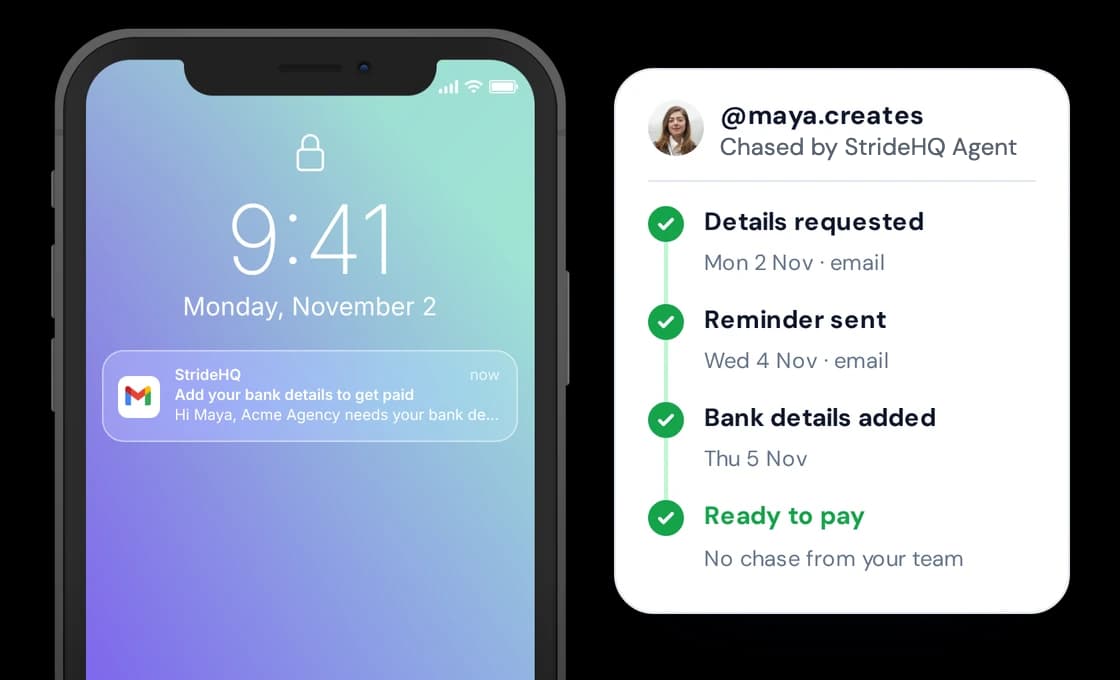
Chases creators
The agent does the chasing.
Missing a tax form or bank details? It follows up until it is fixed. The agent emails the creator, sends reminders until everything is in, and marks them ready to pay as soon as it is.
No chase emails from your team
Creator flagged as ready when complete
Automation, assistant or agent?
Most tools follow rules or answer questions. The StrideHQ Agent gets the work done, then waits for your approval.
Automations
Follow rules.
They stop when something unexpected happens.
Assistants
Answer questions.
Your team still does the work.
The StrideHQ Agent
Gets the work done.
It works towards a goal, checks details, handles uncertainty and prepares work for your approval.
No. The agent prepares the payment run, but nothing is paid until a named person on your team approves it.
Only the data in your StrideHQ account: creator onboarding details, contracts, invoices and payment history.
It reads each invoice, checks the amount, dates and VAT, matches it to the creator's contract, flags duplicates and missing details, chases creators for anything missing, and builds the payment run.
It can't move money, change a creator's bank details, or change your approval rules or limits.
It holds the invoice back from the run and tells you why, rather than guessing. You decide what happens next.
Yes. Every check, chase and change is written to an audit log with a timestamp, showing whether the agent or a person did it.
Yes. You can run every step by hand in StrideHQ and use the agent only where it helps.
See StrideHQ
in action.
Book 15 minutes. See how the StrideHQ Agent takes care of the work behind creator payments.
- The StrideHQ Agent handles creator onboarding
- The StrideHQ Agent checks invoices and prepares payment runs
- See how human controls keep every payment accountable